
Start with the device you actually use
A browser needs no package download and is a useful option on a phone with limited storage. An app may be more convenient for a regular user who wants a direct launch. Compare the route that works on your device rather than downloading several unrelated packages.
The Zambia iPhone listing for 22Bet names Arcadia Hospitality LTD. Regional availability and device requirements belong to the current store listing. Check them on the device before installing rather than relying on a system requirement copied from an old article.
Android download and installation checks
Use the operator’s current mobile-app section for the Android route. Do not treat an APK attached to a social message as the official package. Check the download source and the instructions presented by the operator.
If Android asks for permission to install from that source, understand which source is receiving the permission. After the intended installation, review any permission you enabled. If the package, name or instructions look different from the expected operator route, stop and ask support instead of forcing the installation.
iPhone installation and developer identity
Open the relevant regional App Store listing and compare the app name and developer. Read the device compatibility and update information shown there. An advertisement using a familiar logo does not prove that it leads to the same developer.
After installation, sign in with the existing account. A new app is not a new betting account. If the app is unavailable for the store region or device, use the supported mobile website rather than installing a configuration profile from a stranger.
Ready for the next step?
Open the operator and check the options in your account.
Updating without losing your account
Keep the account ID and recovery contact before reinstalling or switching phones. An update changes the software; it should not require a duplicate account. If a saved password no longer works, use recovery rather than repeating registration.
For a loading fault, record the device, operating-system version, app version and exact error. Check that the phone has space and a working connection. A precise description helps distinguish an installation issue from a service or account issue.
What the screenshots show
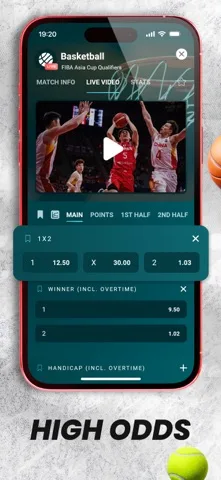
The images on this guide include published artwork from the Zambia App Store listing. They show the developer’s presentation of the mobile product, not a payment test performed by this guide. Your current account screens may differ after an update.
Use the live account for available markets, payment methods and offer terms. A screenshot is helpful for recognising the product, but it does not set the current limits or guarantee a particular result.
A browser shortcut is different from an installation
A home-screen shortcut can open a website without installing the operator’s native app. That may suit a phone with little storage, but it should not be described as a downloaded app package. Check which route you are actually launching when following troubleshooting advice.
If you switch between a shortcut, browser and app, keep the same account identifier. A password saved in one route may not automatically appear in another. Use account recovery when needed instead of treating the empty sign-in fields as a new registration.
When reporting an issue, name the route precisely. “Mobile browser on Android” and a native app with a version number give support different information. Include the screen where the problem starts and whether a transaction was submitted before the interruption.
Make a small installation record
Before changing software, note the account identifier and the recovery contact you can still access. After installation, note the app name, developer and version displayed by the device. This makes a later technical description specific without collecting access credentials.
If an installation fails, record the stage reached: download, permission, installation, launch or sign-in. These are different stages. A download that never completed should be described differently from an app that opens and rejects a password.
Use the current operator instructions and the device’s own prompts for the next action. Preserve any payment or ticket reference if an interruption occurred during account activity. Restoring the software view and establishing whether a submitted transaction completed are separate tasks that can be followed in sequence.
Use a mobile route with fewer unnecessary steps
For a quick account check, the supported mobile website may be enough. For regular use on a compatible device, an app may provide a convenient return route. Compare that convenience with storage, updates and the connection available on the phone.
Keep the same account across the routes you use. A browser may have a saved identifier that the app does not yet contain, so record the actual sign-in details rather than assuming the account is missing. Recovery belongs to the registered contact.
When an issue is resolved, keep only the useful technical note: which route worked, the version used and any support case number. Those details help with a future update without relying on an old package or a screenshot that no longer matches the current device.
The Zambia mobile experience
App information and published artwork from the Zambia store listing.
Read the mobile guide →
Questions, answered
Is the iPhone listing available in Zambia?
A Zambia App Store listing was found for 22Bet Zambia: Sports & Casino, naming Arcadia Hospitality LTD. Check current device and regional availability in the store.
Does the app need a separate deposit?
Your account balance belongs to the account. Use the same account when moving between supported mobile and desktop routes.
Where should I get an Android APK?
Use the operator’s current app section. Avoid packages forwarded through unofficial messages or file-sharing groups.
What should I record before reinstalling?
Keep the account ID, accessible recovery contact and the app or browser version involved in the issue.