
A clear route through your account
Your Zambia account, from first visit to first withdrawal
A betting account is easier to manage when the details line up from the beginning. Use your own name, a phone number you control and a payment account registered to you. Keep a record of the account identifier after registration. That makes it easier to distinguish a sign-in problem from a payment problem later.
This guide separates those tasks. Registration covers the form and country settings. Login covers returning to an existing account. The payment guides follow the money from a wallet into the account and back out again. You can read just the section you need rather than repeating the whole process.
How to register with 22Bet in Zambia
Start from the registration screen and select Zambia if the form asks for a country. Read the currency field before confirming: ZMW is the currency code used for Zambian kwacha. Enter your own contact details and choose a password you do not use for your email or mobile-money account.
Review the available welcome offer before making a deposit. A sports promotion and a casino promotion may have different qualifying activity. The biggest headline is not enough to compare them; the qualifying deposit, wagering rules and expiry matter too. Save the account number or username once the registration completes.
| Check | Where to read it | Keep this record |
|---|---|---|
| Deposit amount | Selected cashier method | Amount, currency and reference |
| Wallet approval | Your provider’s prompt | Wallet confirmation |
| Withdrawable funds | Account balance breakdown | Payout request ID |
| Promotion rules | Offer terms in the account | Campaign and activation |
Login, password recovery and an existing account
Use the sign-in method attached to your account. A phone-number account, an email account and an account identified by a numeric ID are not interchangeable simply because they belong to the same person. If a password fails, use the recovery route before trying to open another account.
An SMS delay is different from a wrong password. Check the destination number shown on the recovery form, the phone signal and whether the message has already arrived. Repeated requests can leave several codes on your phone; use the newest valid code and keep it private.
Ready for the next step?
Open the operator and check the options in your account.
Choose the mobile website or the app
The mobile website is a practical starting point when you want to avoid an installation. A supported app can provide a more direct route back into the same account. Neither option needs a second account or a second wallet.
The Zambia App Store listing identifies Arcadia Hospitality LTD as the app developer. Check the developer and regional listing before installing. For Android, obtain the current download route from the operator rather than an APK forwarded through a chat group. The app guide explains installation checks, updates and what to record if a session stops loading.
Airtel Money, MTN MoMo and Zamtel Kwacha
The Zambia app listing names Airtel Money, MTN MoMo and Zamtel Kwacha alongside card payments. The methods actually presented in your signed-in cashier determine what is available to your account. An option shown on a review page is not a substitute for that screen.
Read the amount, currency, recipient and any payment charge before authorising a wallet prompt. Keep the wallet confirmation and the cashier transaction reference. A wallet debit and a credited betting balance are two separate events, so both records are useful if a deposit needs tracing.
Welcome bonuses and promo codes
A matched deposit adds promotional funds under a set of rules; it is not a cash withdrawal at the moment it appears. Compare the qualifying deposit, the balance used for wagering, eligible markets or games, the deadline and any maximum conversion.
A promo-code page should explain where a code goes and what it changes. This guide does not manufacture a Zambia code or promise a fixed bonus percentage. Use the offer actually displayed for your account. If a form accepts an optional code, check that it has been recognised before finishing the qualifying step.
Sports betting: singles, accumulators and live markets
A single is one selection. An accumulator combines several selections into one result, which means one losing leg normally defeats the whole bet unless the rules provide otherwise. Compare the market name, selection, stake and potential return on the final slip rather than relying on a fixture tile.
Live markets can move while you are looking at them. A television or phone stream may lag behind the event, and a market can be suspended before your bet is accepted. The accepted ticket is the useful record: it shows the price and market that the operator actually accepted.
Casino, slots and live dealer games
Choose a game by its rules and stake controls rather than its artwork alone. Open the information panel to read the paytable, available stake range and any feature conditions. A demo can help you understand controls, but it does not predict the next real-money result.
Live dealer tables add a table limit, round timer and connection requirements. Crash games have their own rules for a round that ends before cash-out. The casino, live-casino and Aviator guides keep these formats separate so that a sports-betting rule is not accidentally applied to a casino game.
Withdrawals, verification and getting help
Before requesting a withdrawal, check the available balance and the route offered in the withdrawal menu. The deposited balance, bonus balance and withdrawable balance may differ. Complete any requested identity checks through the account’s secure process and retain the request reference.
If a payment is pending, identify the stage first: still requested, under review, processed by the operator or received by the wallet. Send support the relevant reference and a short timeline. Never include a password, a wallet PIN or a one-time code in a support message.
Where to go next
New users usually need registration, bonus terms and a payment guide. Returning users are more likely to need login, withdrawal or customer care. The navigation and related guides follow those routes so that you can move to the next task without a long detour.
The review page brings the main choices together. The About page explains the editorial method and partner links, and the responsible-gambling page covers limits and stopping. This is a guide to using the service, not the operator’s account area.
Three common visits, three different routes
If you are opening an account, begin with registration and stop before the payment step to review the chosen offer. The question at that point is whether the contact, country and currency are correct. A game catalogue is not yet the useful next screen.
If you already have money in the account, start with login and the balance history. Do not repeat registration because a saved password fails. If the question concerns a withdrawal, keep the existing request ID and read its status before sending a new request.
If you are comparing ways to use a phone, start with the app guide. Check the source and compatibility, then use the existing account. These routes meet at the same account, but the first action differs. That is why this guide provides individual pages rather than making every visitor work through a single long sign-up article.
A useful payment record in practice
Consider a wallet deposit where the phone shows a debit but the betting balance has not updated. The useful record contains the requested amount in ZMW, the payment method, time, wallet reference and the corresponding cashier status. It does not need a wallet PIN or an extra deposit.
For a withdrawal, the record starts with the payout request ID instead. Note when it was requested, the destination method, the latest status and any document request. If it is marked processed, the receiving wallet record becomes the next comparison.
Keeping these two examples separate avoids sending support a collection of unrelated screenshots. Start from the last confirmed event and ask for the next missing one. The payment and pending-withdrawal pages provide the detailed checklist for those stages.
Plan a first visit around one decision
Choose what you need from the visit before opening several account screens. A new user can begin with the registration checklist, while an existing customer can go straight to the account history. The useful next action depends on that starting point. Reading a promotion, learning a game and resolving a payment are three separate tasks.
For a new account, prepare the contact and currency settings first. Once the profile is complete, read the payment method you intend to use and the relevant welcome-offer terms. You can compare those details before authorising a deposit. Save the account identifier somewhere you can find when changing devices.
For a returning account, begin with the record related to the question. A ticket ID locates a sports bet, a round ID locates a casino event and a payout ID locates a withdrawal. The linked guides below follow those records through the next step. That makes a short visit productive even when you do not need the whole overview.
A mobile-money decision in kwacha
Imagine that K100 is the total amount you set aside for a period. Before sending any of it, read the selected method’s limits and any provider charge. A payment that fits the cashier range still needs to fit that original total. If an offer requires more than the amount you planned, read it as a separate commercial choice.
After authorisation, compare the wallet confirmation with the cashier entry. Keep one record for the request and another for its result. If the wallet was debited and the betting balance remains unchanged, those two records define a precise deposit query. They are more informative than sending several screenshots of the same unchanged balance.
Use the same discipline for a withdrawal: read the available funds, destination and status. A successful earlier deposit establishes a transaction record, while the withdrawal menu supplies the current payout instructions. The wallet-specific pages cover the details to retain for Airtel Money, MTN MoMo and Zamtel Kwacha.
Find the relevant rule before a game or market
The rule panel answers a different question from the welcome-offer panel. For football, identify the competition, event and market period. A bet on the match result and a bet on qualification can involve the same teams but settle against different conditions. Check the full label on the final slip.
For a slot, read the stake control and the price of any optional feature. For a live table, read the table limits and betting window. For a crash game, identify how an accepted stake and cash-out are confirmed. Each format needs its own record if a session is interrupted.
The sports, casino, live-casino and Aviator pages are separate so you can read the relevant format directly. Start with controls and terms, then decide whether the format suits the time and budget you chose. A clear understanding of one format is more useful than treating every lobby tile as the same kind of activity.
The Zambia mobile experience
App information and published artwork from the Zambia store listing.
Read the mobile guide →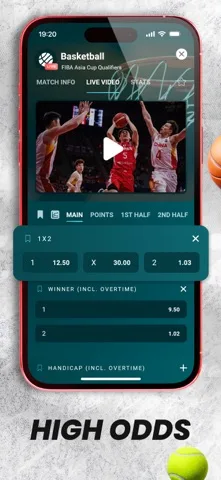

Questions, answered
What currency should I check for Zambia?
Check that the account and cashier show the currency you intend to use. ZMW is the currency code for Zambian kwacha; the amount and currency on the final payment screen are what you authorise.
Can I use the same account on mobile and desktop?
Use the existing account’s sign-in details on a supported operator app or website. Do not open a second account simply to change devices.
Where are the current deposit limits?
Open the selected payment method in your signed-in cashier. The minimum, maximum and any method-specific charges should be checked before confirming.
Does this website collect deposits?
No. Registration and account activity take place with the operator. This independent guide explains the steps and uses partner links.